Guide
A SeatPlan.io alternative for iPhone and iPad
Last updated November 10, 2026
What SeatPlan.io does well
To be fair to it, SeatPlan.io is a capable tool. According to its website, FAQ and app page, it:
- runs in the browser on a phone, a tablet or a computer, with nothing to install and no signup to start;
- has no guest or table limit, on the free designer and the paid plans alike;
- shows the room in 3D, and builds a layout from a photo or PDF of a floor plan with AI;
- lets a partner or planner edit the same chart live on its Collaborate plan;
- gives guests a QR seat finder and Apple or Google Wallet seat passes on Collaborate and Event & Venue Manager;
- has plans for planners, venues, schools and non-profits.
Which tool fits you
Planning on Android or a laptop, or for clients
If you want a big screen, plan on Android, or lay out events for clients and venues, SeatPlan.io runs wherever there's a browser and scales up to its Event & Venue Manager plan.
Planning your own event on iPhone or iPad
Headtable is an app, so the plan is saved on your phone from the first tap, opens without a connection at the venue, and stays yours after the wedding. It adds seating rules, Auto-arrange and online RSVP, and it's paid for once.
Headtable and SeatPlan.io compared
| Headtable | SeatPlan.io | |
|---|---|---|
| Made for | Couples and hosts planning their own event | Couples and hosts, with separate plans for planners, venues and classrooms |
| Where it runs | iPhone and iPad, as an app | A web browser on a phone, tablet or computer; no App Store or Google Play app |
| Offline | Yes | No; it needs an internet connection to open and to save |
| Account | None | None to try; an account and a paid plan to save your work |
| Free version | Whole guest list, unlimited tables and rules, 50 seated guests, saved on your device, first 8 RSVP replies, chart as a PDF | The full designer with no guest or table limit; charts aren't saved and can't be exported |
| Price | Free up to 50 seated guests; Pro is a one-time purchase (US$12.99 in the US; prices vary by country) | Pro (€8) and Collaborate (€14) are one-time payments; Event & Venue Manager is a subscription (€35 a month, billed annually) |
| How long it lasts | Pro doesn't expire, and your plan stays on your device | Pro and Collaborate give 90 days of editing and export per payment; after that the chart is view-only for a grace period, then can be deleted |
| Floor plan | Round, oval, square, head and sweetheart tables, banquet tables up to 60 chairs, venue elements; plan the room to scale; trace a venue photo with Pro | Tables, chair rows and special areas, a 3D view, and AI import of a floor plan photo or PDF; a room set to scale and CAD files on Event & Venue Manager |
| Seating help | Keep-together and keep-apart rules, and Auto-arrange that respects them | Drag guests to chairs, swap seats, move a group at once; seating rules: — |
| Online RSVP | Private invitation links; guests need no app or account | — |
| Printing | Chart as PDF or image for free; Pro adds an escort list, place cards, table numbers and an 18×24 in poster | On paid plans: the chart as an A3 PDF, the guest list as PDF or Excel, place cards and name tags |
| Working together | Up to four people edit one plan from their own phones; inviting needs Pro | Up to two collaborators on Collaborate; unlimited on Event & Venue Manager |
| Guests finding seats | Each guest's seat by text or email; a find-my-seat QR page with Pro | A QR seat finder and Apple or Google Wallet passes on Collaborate and Event & Venue Manager |
| Day-of check-in | Yes, free | On Event & Venue Manager |
SeatPlan.io's prices are the ones its pricing page showed in euros on November 10, 2026; yours may be shown in another currency. "—" means SeatPlan.io's website doesn't say.
What Headtable adds on iPhone and iPad
- Your plan is saved on your device from the start, for free, with no account to create.
- It works offline, so you can reseat a late RSVP at a venue with no signal.
- Keep-apart rules that flag a table seating exes or feuding relatives together, and an Auto-arrange that respects every rule.
- Online RSVP by private link, with meals, allergies and a plus-one if you allow it; a “no” frees that guest's seat.
- One price, paid once, with no 90-day window, and shared through Family Sharing.
How to move your guest list from SeatPlan.io to Headtable
- Get your guest list out of SeatPlan.io. On a paid plan, export the guest list as an Excel file. The free designer doesn't save or export, so if that's what you used, find the spreadsheet you started from.
- Install Headtable and open the Guests tab.
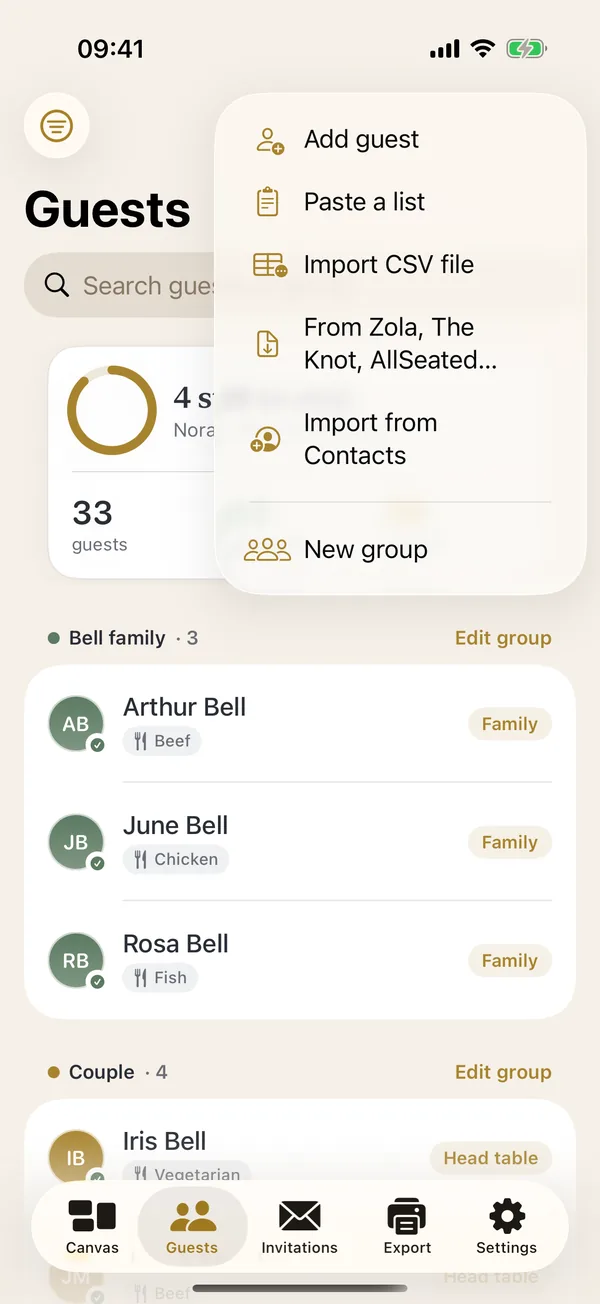
- Tap + and choose Import CSV file, then pick your CSV or Excel file. Headtable matches columns by their headings: name (or first and last name), party or group, RSVP, meal, dietary notes, phone and email.
- Set up the room on the Canvas tab with your guest count and table size, then drag guests to their tables or tap Auto-arrange.
- Optional, with Pro: add a picture of your venue's floor plan as the venue photo and place your tables over it.
Bring your guest list over in a few minutes.
 Download on theApp Store
Frequently asked questions
Is SeatPlan.io free?
The designer is free to use in a web browser, with no signup and no guest or table limit. Saving a chart, exporting it, printing it or sharing it needs a paid plan, and SeatPlan.io says it doesn't store charts for free or anonymous users, so the work is lost when you close the browser without upgrading.
Is SeatPlan.io a subscription?
Not for a single event. Its Pro and Collaborate plans are one-time payments that give 90 days of access and don't renew by themselves. Event & Venue Manager, for planners and venues, and Classroom are subscriptions.
Does SeatPlan.io have an iPhone app?
No. SeatPlan.io is a web app with no App Store or Google Play listing. You open it in Safari and can add it to your Home Screen. It needs an internet connection to open and to save.
What is a good SeatPlan.io alternative for iPhone?
Headtable, for iPhone and iPad. It saves your plan on the device, works offline and needs no account. It's free for your whole guest list and up to 50 seated guests, and Headtable Pro is a one-time purchase (US$12.99 in the US; prices vary by country) that seats everyone and adds the full print pack.
Can I move my SeatPlan.io guest list into Headtable?
Yes. On a paid SeatPlan.io plan, export the guest list as an Excel file, then in Headtable open Guests, tap + and choose Import CSV file. Headtable reads CSV and Excel files and matches name, party, RSVP, meal, dietary, phone and email columns by their headings. If you only used the free designer, import the spreadsheet you started from.
Does Headtable work on Android or a computer?
No. Headtable runs on iPhone and iPad. If you plan on Android or a laptop, SeatPlan.io is the better fit. Your guests can use Headtable's invitation links and find-my-seat page in any web browser.
Sources
Headtable on the App Store: apps.apple.com/app/id6807763163
- seatplan.io and its pricing, checked November 10, 2026
- SeatPlan.io: frequently asked questions
- SeatPlan.io: seating chart app
- Best wedding seating chart apps compared