Guide
A Prismm (AllSeated) alternative for planning your own seating chart
Last updated October 7, 2026
What's happening to Prismm
Cvent acquired Prismm and is moving its customers to Cvent Event Diagramming. According to Cvent's Prismm migration FAQ:
- September 2026New events can only be created in Cvent Event Diagramming.
- Through June 2027Existing Prismm events can still be edited.
- After June 2027Prismm work stays in Cvent in view-only mode.
Some sites still give December 31, 2026 as the end date. Cvent has since extended the timeline, so check its FAQ for the latest dates.
Which tool fits you
Venues, caterers and event companies
If you need to-scale CAD floor plans, 3D views, room inventory or sales tools, Cvent Event Diagramming is the intended replacement, and dedicated venue tools are worth comparing.
Couples, families and hosts
Planning one wedding, party or banquet, you mainly need a guest list, tables, seating rules, RSVPs and a chart to print. That's what Headtable is built for.
Headtable and Prismm compared
| Headtable | Prismm | |
|---|---|---|
| Made for | Couples and hosts planning their own event | Venues, planners and event teams |
| Where it runs | App for iPhone and iPad | Web, now part of Cvent |
| Floor plan | 2D canvas with round, oval, square, rectangular, head and sweetheart tables and venue elements; trace a venue photo with Pro | 2D floor plans and 3D views |
| Working together | Plan on your iPhone or iPad; send the chart PDF or CSV to your venue and caterer | Real-time collaboration in the browser |
| Price | Free up to 50 seated guests; Pro is a one-time purchase (US$12.99 in the US; prices vary by country) | Moving to Cvent Event Diagramming's plans |
| Status | Actively developed; latest update October 2026 | No new events since September 2026; editing ends June 2027 |
What Headtable adds for couples
- Online RSVP by private link: guests reply without an app or account, with their meal, allergies and a plus-one if you allow it.
- Keep-together and keep-apart rules, and Auto-arrange that respects them.
- Meal counts per table for the caterer, and a printed chart color-coded by meal.
- With Pro: an escort list, place cards, table numbers, an 18×24 in seating poster and a find-my-seat QR code for the door.
- Works offline, and your guest list stays on your device.
How to move your guest list from Prismm to Headtable
- Export from Prismm while you still can. Open your event and export the guest list as a CSV or Excel file. Save your floor plan as a PDF or image too.
- Save an Excel file as CSV. In Excel, choose File → Save As → CSV UTF-8. In Numbers, choose File → Export To → CSV.
- Install Headtable and open the Guests tab.
- Tap + and choose From Zola, The Knot, AllSeated, then pick your file. Headtable reads name (or first and last name), party or household, RSVP, meal, dietary notes, phone and email columns, with headers in English, Spanish, Italian, German or French.
- Set up the room with your guest count and table size, then drag guests to their tables or tap Auto-arrange.
- Optional, with Pro: add your Prismm floor plan as the venue photo and place your tables over it.
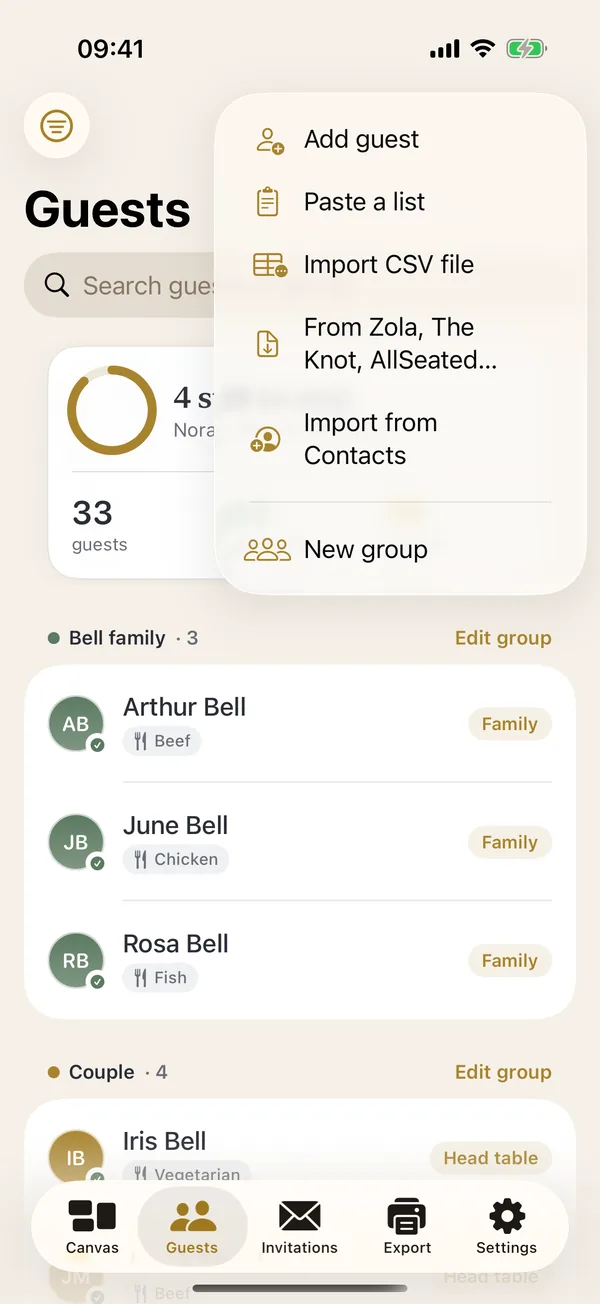
Bring your list over in a few minutes.
 Download on theApp Store
Frequently asked questions
Is Prismm shutting down?
Prismm is being retired in favor of Cvent Event Diagramming. Since September 2026 new events can only be created in Cvent Event Diagramming. Existing Prismm events can be edited through June 2027, and after that they stay in Cvent as view-only.
Is AllSeated the same as Prismm?
Yes. AllSeated renamed itself Prismm, and Cvent later acquired Prismm.
Can I still open my Prismm seating chart?
Yes. You can keep editing existing Prismm events through June 2027 and view them in Cvent after that. Export your guest list and floor plan now, so you have your own copy.
Is Headtable free?
Headtable is free for your whole guest list and up to 50 seated guests, including online RSVP for your first 8 replies and the chart as a PDF. Headtable Pro is a one-time purchase (US$12.99 in the US; prices vary by country) that seats everyone and adds the full print pack. There is no subscription.
Does Headtable have 3D or to-scale CAD floor plans?
No. Headtable is a 2D seating canvas with real table shapes and venue elements, and Pro can put a photo of your venue's floor plan under it. If you need to-scale CAD drawings or 3D walkthroughs for a venue, a venue tool such as Cvent Event Diagramming fits better.
Can I use Headtable on a computer or Android phone?
No. Headtable runs on iPhone and iPad. Your guests can use any phone or computer: invitation links and the find-my-seat page open in a web browser.