Guide
A Seat Puzzle alternative with no subscription
Last updated October 17, 2026
What Seat Puzzle does well
To be fair to it, Seat Puzzle is a capable floor planner. According to its App Store listing and website, it:
- draws floor plans up to 500 by 500 feet, with walls, doors, windows and several rooms;
- has a large item library, from U-shaped and serpentine tables to audio and video gear;
- runs on iPhone, iPad, Mac, Android and the web, synced through a Seat Puzzle account;
- shares events by view-only or editable links, and reuses floor plans as templates;
- publishes an online RSVP page from Seat Puzzle Web.
Which tool fits you
Planners, coordinators and venues
If you lay out events for clients all year, need walls, doors and rooms to scale, or work on Android or a computer, Seat Puzzle's subscription is built for that.
Couples, families and hosts
Planning one wedding or party, you mainly need the guest list, the tables, who sits with whom, RSVPs and a chart to print. Headtable does that on iPhone and iPad, paid for once.
Headtable and Seat Puzzle compared
| Headtable | Seat Puzzle | |
|---|---|---|
| Made for | Couples and hosts planning their own event | Planners and coordinators, and anyone who needs detailed floor plans |
| Where it runs | iPhone and iPad | iPhone, iPad, Mac, Android and the web |
| Price | Free up to 50 seated guests; Pro is a one-time purchase (US$12.99 in the US; prices vary by country) | Subscription: US$5.99 a week, US$19.99 a month, or US$69.99 or US$129.99 a year on the US App Store |
| Free version | Whole guest list, unlimited tables and rules, 50 seated guests, first 8 RSVP replies, chart as a PDF | A free demo; limits not published |
| Account | None | A Seat Puzzle account syncs your devices |
| Floor plan | Round, oval, square, head and sweetheart tables, banquet tables up to 60 chairs, venue elements; plan the room to scale; trace a venue photo with Pro | Floor plans up to 500×500 ft with walls, doors, windows, several rooms and a large item library |
| Seating help | Keep-together and keep-apart rules, and Auto-arrange that respects them | Guest parties and +1s seat together; bulk seating |
| Online RSVP | Private invitation links; guests need no app or account | A published RSVP page from Seat Puzzle Web |
| Printing | Chart as PDF or image for free; Pro adds an escort list, place cards, table numbers and an 18×24 in poster | PDF exports with guest pages, images and a guest CSV |
| Working together | Up to four people edit one plan from their own phones; inviting needs Pro | View-only or editable event links |
| Offline | Yes | Yes |
What Headtable adds for couples
- Keep-apart rules that flag a table seating exes or feuding relatives together, and an Auto-arrange that respects every rule.
- Online RSVP by private link, with meals, allergies and a plus-one if you allow it; a “no” frees that guest's seat.
- With Pro, a print pack for the day: an alphabetical escort list, place cards, table numbers, an 18×24 in poster and a find-my-seat QR code.
- Day-of check-in, and each guest's seat sent to them by text or email.
- One price, paid once and shared through Family Sharing.
How to move your guest list from Seat Puzzle to Headtable
- Export your guests from Seat Puzzle. Open the event's guest report and export the guest spreadsheet as a CSV (see Seat Puzzle's help center). Save your floor plan as a PDF or image too.
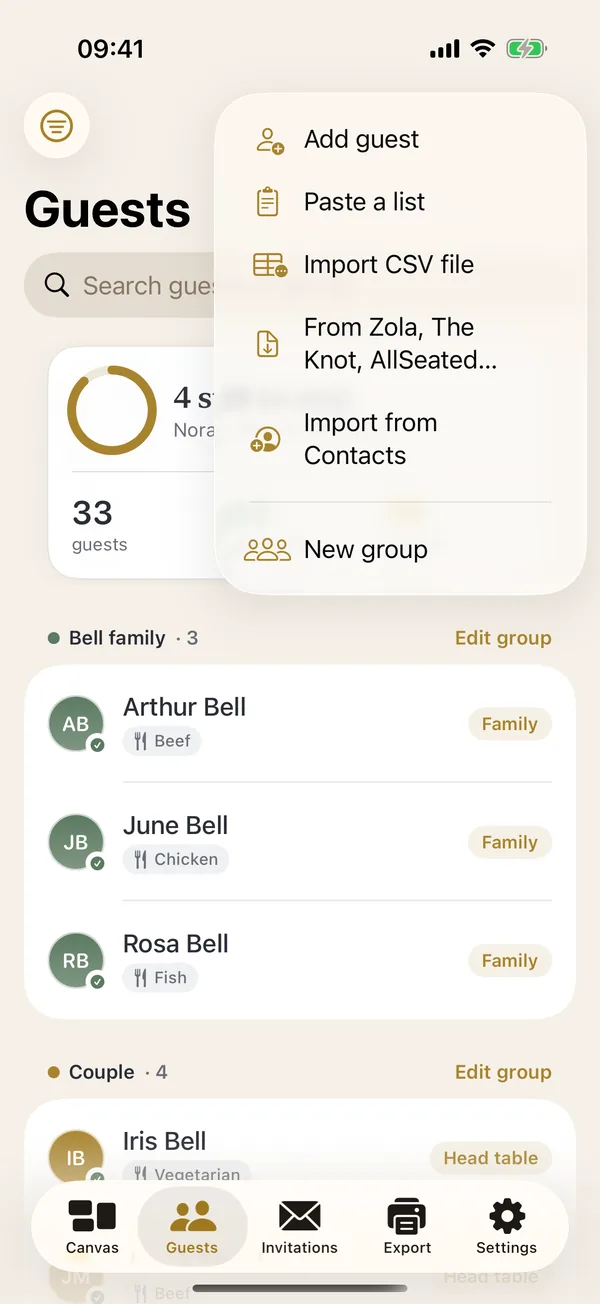
- Install Headtable and open the Guests tab.
- Tap + and choose Import CSV file, then pick your file. Headtable matches columns by their headings: name (or first and last name), party or group, RSVP, meal, dietary notes, phone and email.
- Set up the room on the Canvas tab with your guest count and table size, then drag guests to their tables or tap Auto-arrange.
- Optional, with Pro: add your Seat Puzzle floor plan image as the venue photo and place your tables over it.
- Cancel the subscription if you bought Seat Puzzle through the App Store: on your iPhone, open Settings, tap your name, then Subscriptions.
Bring your guest list over in a few minutes.
 Download on theApp Store
Frequently asked questions
What is Wedding Seating Chart Planner by Puzzle Party?
It's the App Store name of Seat Puzzle, a floor plan and seating chart app by Puzzle Party, LLC for iPhone, iPad, Mac, Android and the web.
Is Seat Puzzle free?
Seat Puzzle offers a free demo, and its full version is a subscription: weekly, monthly or yearly. The US App Store lists US$5.99 a week, US$19.99 a month, and US$69.99 or US$129.99 a year. Seat Puzzle doesn't publish the free version's limits.
Is Seat Puzzle a subscription?
Yes. Its App Store listing describes the Seat Puzzle membership as a weekly, monthly or annual subscription that renews automatically until you cancel it.
What is a good Seat Puzzle alternative without a subscription?
Headtable, for iPhone and iPad. It's free for your whole guest list and up to 50 seated guests, and Headtable Pro is a one-time purchase (US$12.99 in the US; prices vary by country) that seats everyone and adds the full print pack.
Can I import my Seat Puzzle guest list into Headtable?
Yes. Export the guest spreadsheet as a CSV from Seat Puzzle's guest report, then in Headtable open Guests, tap + and choose Import CSV file. Headtable matches name, party, RSVP, meal, dietary, phone and email columns by their headings.
Does Headtable work on Android, Mac or the web?
No. Headtable runs on iPhone and iPad. If you plan on Android or a computer, Seat Puzzle is the better fit. Your guests can use Headtable's invitation links and find-my-seat page in any web browser.
Can Headtable draw walls and rooms to scale?
Partly. You can enter the room's size to plan to scale, and Headtable flags tables that sit too close. It doesn't draw walls, doors or several rooms; Seat Puzzle does.
Sources
Headtable on the App Store: apps.apple.com/app/id6807763163